
Of course we do everything we can to help you solve a problem with our products as quickly as possible. The manuals of all the products we offer can be downloaded from the product page of the respective product.
To make sure that you can see all available documents, it is important that you are logged in with your reseller account.
If the manual of the product in question does not offer an immediate solution, an overview of the most common and easy-to-solve problems can be found on the right for each handset.
Cannot find the solution? fill in our warranty form and we will help you solve your problem!
Warranty form

1. Determine what type of handset you have
Our products have different types of handsets. For example, it is possible that your product uses the TDH6, TDH18P or WP-H01. The type of handset can be identified by the code on the back of the handset. It is important to first understand the setting options available for each type of handset. We therefore recommend that you first read the manual of the handset in question.
To view the correct manual, select the appropriate handset below.
WP-H74T

Below you can find the manual and error code list for the WP-H74T handset.
If you do not know why your frame is not functioning properly, please perform a hard reset, this solves 95% of problems. You can find the steps on how to perform a hard reset in the instruction manual below.
If the handset displays an error code, please see the error code list below.

WP-H75T
Below you can find the manual and error code list for the WP-H75T handset.
If you do not know why your frame is not functioning properly, please perform a hard reset, this solves 95% of problems. You can find the steps on how to perform a hard reset in the instruction manual below.
If the handset displays an error code, please see the error code list below.
WP-H144

Below you can find the manual and error code list for the WP-H144 handset.
If you do not know why your frame is not functioning properly, please perform a hard reset, this solves 95% of problems. You can find the steps on how to perform a hard reset in the instruction manual below.
If the handset displays an error code, please see the error code list below.
WP-H145
Below you can find the manual and error code list for the TDH6 handset.
If you do not know why your frame is not functioning properly, please perform a hard reset, this solves 95% of problems. You can find the steps on how to perform a hard reset in the instruction manual below.
If the handset displays an error code, please see the error code list below.
WP-H146
Below you can find the manual and error code list for the TDH6 handset.
If you do not know why your frame is not functioning properly, please perform a hard reset, this solves 95% of problems. You can find the steps on how to perform a hard reset in the instruction manual below.
If the handset displays an error code, please see the error code list below.
WP-H76

Below you can find the manual and error code list for the WP-H76 handset.
If you do not know why your frame is not functioning properly, please perform a hard reset, this solves 95% of problems. You can find the steps on how to perform a hard reset in the instruction manual below.
If the handset displays an error code, please see the error code list below.
WP-H78
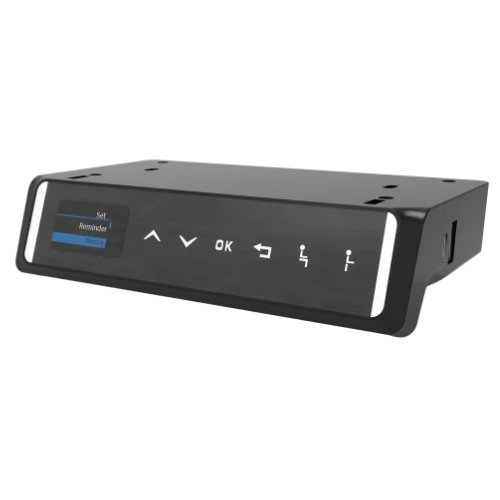
Below you can find the manual and error code list for the WP-H78 handset.
If you do not know why your frame is not functioning properly, please perform a hard reset, this solves 95% of problems. You can find the steps on how to perform a hard reset in the instruction manual below.
If the handset displays an error code, please see the error code list below.
WP-H33N

Below you can find the manual and error code list for the WP-H33N handset.
If you do not know why your frame is not functioning properly, please perform a hard reset, this solves 95% of problems. You can find the steps on how to perform a hard reset in the instruction manual below.
If the handset displays an error code, please see the error code list below.
WP-H37

Below you can find the manual and error code list for the WP-H37 handset.
If you do not know why your frame is not functioning properly, please perform a hard reset, this solves 95% of problems. You can find the steps on how to perform a hard reset in the instruction manual below.
If the handset displays an error code, please see the error code list below.
WP-H94

Below you can find the manual and error code list for the WP-H94 handset.
If you do not know why your frame is not functioning properly, please perform a hard reset, this solves 95% of problems. You can find the steps on how to perform a hard reset in the instruction manual below.
If the handset displays an error code, please see the error code list below.
TDH6 (discontinued)

Below you can find the manual and error code list for the TDH6 handset.
If you do not know why your frame is not functioning properly, please perform a hard reset, this solves 95% of problems. You can find the steps on how to perform a hard reset in the instruction manual below.
If the handset displays an error code, please see the error code list below.
TDH18P (discontinued)

Below you can find the manual and error code list for the TDH18P handset.
If you do not know why your frame is not functioning properly, please perform a hard reset, this solves 95% of problems. You can find the steps on how to perform a hard reset in the instruction manual below.
If the handset displays an error code, please see the error code list below.
WP-H01 (discontinued)

Below you can find the manual and error code list for the WP-H01 handset.
If you do not know why your frame is not functioning properly, please perform a hard reset, this solves 95% of problems. You can find the steps on how to perform a hard reset in the instruction manual below.
If the handset displays an error code, please see the error code list below.
2. Troubleshooting other problems
We hope that the issue with your product has been resolved by using the provided instruction manual and error code list.
If your issue has not been resolved, please contact us by sending a photo and video of the specific problem to [email protected]
We will come back to you with a solution as soon as possible!